Network
Servers URLs
Get the public link of your server
Each server has a public port accessible via HTTP and a subdomain accessible via HTTPS.
Find your server's port
To find your server's port, go to its panel and navigate to the Network page:
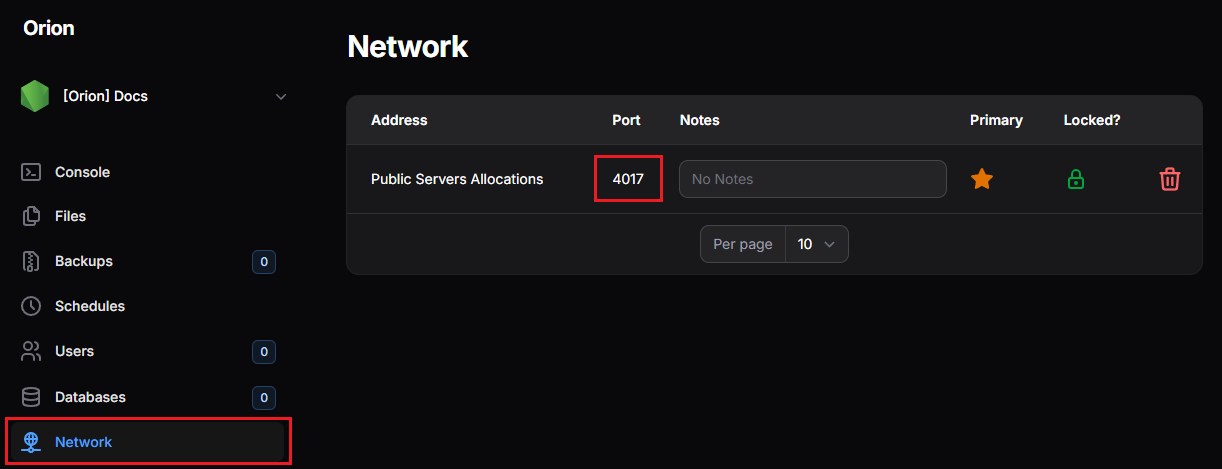
In this example, the port is 4017. The public link for this server is therefore at: http://fr1.orionhost.xyz:4017. Simply replace the port number with your server's port to get its link.
Example:
| Port | Node | Public Link | Secure Public Link (HTTPS) |
|---|---|---|---|
| 4017 | fr1 | http://fr1.orionhost.xyz:4017 | https://4017.fr1.orionhost.xyz |
Regarding HTTPS
Although it's technically possible to put your own SSL certificate on your server to get HTTPS, this is not necessary because an HTTPS link to your server already exists.
The certificate is automatically renewed, you don't have to worry about it.
Hosting an application
To host your application, you must specifically launch it on the port that was assigned to you. If you launch it on port 80, 8080, or other, it will not be accessible from outside.